OrderCtrl vs TrackMage

Tracking is the start. OrderCtrl handles what comes next.

TrackMage covers tracking pages and notifications. OrderCtrl adds what happens when a box goes wrong: issue detection, claims, returns and protection on the same order.

The short answer.

Both can be the right call. Here’s how to tell which fits your store.

Choose OrderCtrl if you want

  • Tracking numbers you add, or get from labels you buy, saved to WooCommerce
  • Late, stalled and lost boxes flagged against your delivery promise
  • Claims, returns and protection on the same order, not in another app

PricingFree for 100 shipments a month, from $40 for 500. Every feature on every plan.

Choose TrackMage if

  • Tracking pages, notifications and analytics cover your needs
  • You price by orders rather than shipments
  • You already have returns and protection sorted

PricingFree to 100 orders a month. TrackMage’s WordPress.org listing says stores with 100 or fewer orders a month can use it free. Its Shopify pricing page lists $8.99/month for 100 orders and $28.99/month for 500. Orders and shipments differ when orders ship in several boxes.

What TrackMage is: Shipment tracking pages, notifications and carrier analytics, with a WooCommerce plugin, priced by monthly order volume.

Side by side

OrderCtrl and TrackMage, feature by feature.

Everything in the OrderCtrl column is on every plan, including Free.

Features of OrderCtrl and TrackMage for a WooCommerce store
What you needOrderCtrlTrackMage
WooCommerce connectionBuilt for WooCommerce. Connects in one approval and syncs both ways.WordPress.org plugin.
PricingPublished. Free for 100 shipments a month, then from $40 for 500. Priced by the shipment.Free to 100 orders a month. Paid plans by order volume.
SetupSelf-serve setup wizard, no demo needed.Self-serve, with a 14-day free trial.
Tracking page and shipping emailsBranded portal on your domain, 50+ carriers, delay and loss alerts, and shipping emails.Yes.
Returns and exchangesClaims and returns by your rules: refund, store credit, replacement or exchange, with prepaid return labels.Not listed
Package protectionYour own program. You set the price and keep 100% of the fee.Not listed
Shipping labelsBuy, print and void labels on the order, on our account or your own Shippo or EasyPost.Not listed
Subscription self-serviceSkip, pause, swap and change frequency on WooCommerce Subscriptions, for customers and your team.Not listed
Customer cancels and address changesIn your portal, with your time limits and approval rules. Addresses are checked with a suggested fix.Not listed
HelpdeskOrder card and suggested replies in 8 helpdesks, including Gorgias, Zendesk and Richpanel.Not listed

TrackMage details come from its own pages and app listings, checked October 28, 2026 and linked below. “Not listed” means we didn’t find it there, so ask TrackMage to confirm.

One app instead of several

What changes when it’s all one order.

Every tool after checkout can work well on its own. The cost shows up between them.

For customers

A tracking page, then a different form when something goes wrong.

One branded portal to track every box and report a problem.

For your team

A tracking app shows the delay. The fix happens somewhere else.

The delay, the claim and the replacement on one order screen.

For your stack

A plugin to add tracking, a service to track it, a tool for labels.

One app adds tracking, buys labels and tracks every box.

One order screen

When a box stalls, the fix is one click away.

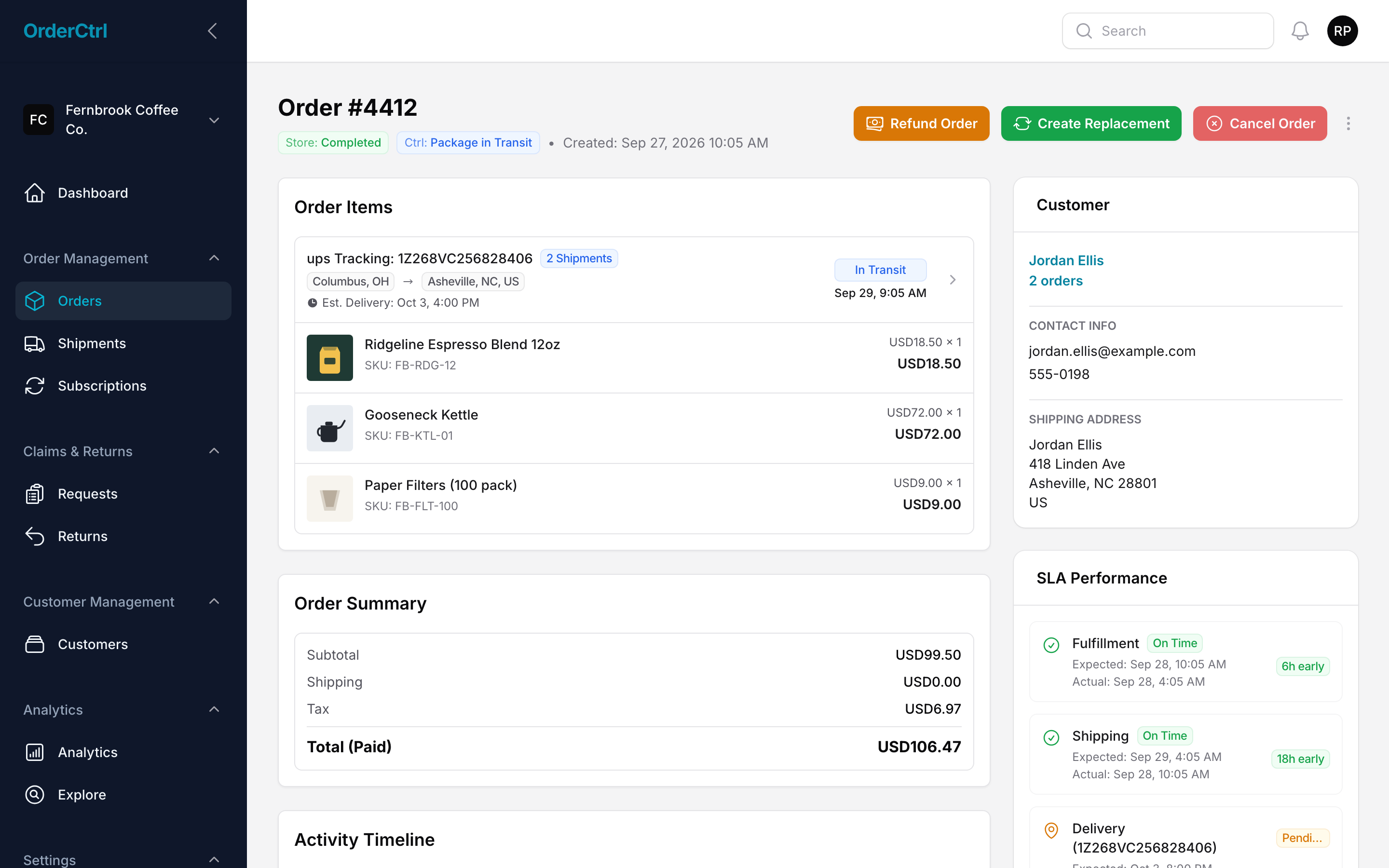
Tracking, issue flags, claims and refunds live on the same order. Your team replaces, refunds or reships without opening another tool, and every change syncs to WooCommerce.

  • Add tracking or buy labels on the order
  • Stalled and lost boxes flagged automatically
  • Replacements and refunds in one click
See OrderCtrl next to wp-admin
OrderCtrl order page with shipments, tracking and one-click fixes for a demo WooCommerce store.

OrderCtrl vs TrackMage: questions

What’s the main difference between OrderCtrl and TrackMage?

TrackMage covers tracking pages and notifications. OrderCtrl adds what happens when a box goes wrong: issue detection, claims, returns and protection on the same order.

When is TrackMage the better choice?

TrackMage is a good fit if: tracking pages, notifications and analytics cover your needs; you price by orders rather than shipments; you already have returns and protection sorted.

How is OrderCtrl priced?

Free for 100 shipments a month, then $40 for 500, $60 for 1,000 and $165 for 3,000. Every feature is on every plan. One credit tracks one shipment; an order shipped in two boxes uses two.

Can I switch without changing my WooCommerce store?

Yes. OrderCtrl connects to WooCommerce in one approval, imports recent orders and runs beside your store. Your catalog, checkout and customer accounts stay in WooCommerce. You can run both tools side by side while you move over.

Sources. TrackMage details come from its own pages and app listings, checked October 28, 2026: TrackMage on WordPress.org · TrackMage Shopify pricing · TrackMage pricing. Prices and plans change, so check with TrackMage before deciding.

How we compare. We compare OrderCtrl’s current product with what TrackMage publishes on its own pages. This is general information and our summary, not a complete review of either product. “Not listed” means we didn’t find a feature on those pages, not that TrackMage can’t do it.

Trademarks. TrackMage and its product names and logos are trademarks of their respective owners, used here only to identify the products compared. OrderCtrl isn’t affiliated with, sponsored by or endorsed by TrackMage. WooCommerce is a trademark of Automattic Inc. Shopify and other product names belong to their respective owners.

Corrections. If you represent TrackMage and something here is inaccurate or out of date, email legal@orderctrl.io with the page and the change. We review every request and update the page when a detail is wrong.

See every comparison.